@mytime = Time.zone.now.in_time_zone("London")
# Creates a TimeWithZone instance (instead of just a Time instance)

@mytime.period.local_start = 2010-03-28T02:00:00+00:00 Local Standard Time
# This is when daylight savings time starts

@mytime.period.local_end = 2010-10-31T02:00:00+00:00 Local DST
# This is when dst ends

----------------------------------
@sometime = Time.parse('2010-3-27 01:00:00').in_time_zone("London")
# 2010-03-26 16:00:00 +0000
@sometime.period.std_offset
# 0
@mytime.period.local_after_start?(@sometime)
# false
@mytime.period.local_before_end?(@sometime)
# true
----------------------------------
@sometime = Time.parse('2010-3-29 05:00:00').in_time_zone("London")
# 2010-03-28 21:00:00 +0100
@sometime.period.std_offset
# 3600 << Note that std_offset now holds the offset time for daylight savings in seconds
@mytime.period.local_after_start?(@sometime)
# true
@mytime.period.local_before_end?(@sometime)
# true
----------------------------------
@sometime = Time.parse('2010-12-29 05:00:00').in_time_zone("London")
# 2010-12-28 20:00:00 +0000
@sometime.period.std_offset
# 0
@mytime.period.local_after_start?(@sometime)
# true
@mytime.period.local_before_end?(@sometime)
# false
2010/07/29
Find out when Daylight Savings Time (DST) starts and ends using Ruby (on Rails)
Recently encountered a requirement to find out whether a particular date falls within daylight savings time. After banging my head on the wall for a few hours trying to figure it out, I found that the ruby TimeWithZone object makes this quite simple.

2010/07/10
Sometimes I feel like killing Aptana...
I'm probably doing something stupid, but always seem to lose my project files in Aptana. "You attempted to go into a closed project" it tells me. Well, Aptana, if you show me the folder list I can probably open the project so I can go into it. But no, you have to make this such a challenge every time.
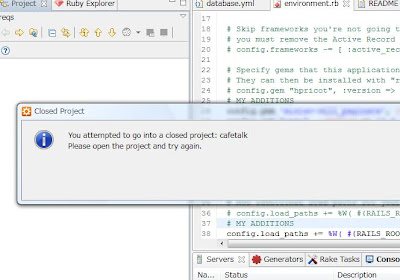 The solution for me, it turns out, is to
 The solution for me, it turns out, is to
- Go to my Ruby Explorer
- Right click on the empty window
- Select "open project"
- Open whatever project Aptana is insisting I want to get into.
- Go back to the Project Tree
- Keep clicking the "Go Up" icon to reveal the entire workspace
2010/07/01
collection_select の値を rjs に渡す
備忘録
<%= f.collection_select(:something , Company.find(:all), :id, :name,
  {},
  {:onchange => remote_function(:url => {:action => "change_vendor"}, :with => "'id='+this.value")}
 )%>
:with で含めた値がパラメータとして渡されます。
2010/05/19
ネコがはまる: 530 5.7.0 Must issue a STARTTLS command first
Rails Actionmailer を使って gmail からメール送信してみる。
config.action_mailer.delivery_method = :smtp
config.action_mailer.smtp_settings = {
  :enable_starttls_auto => true,
  :address        => "smtp.gmail.com",
  :port           => 587,
  :domain         => "admin@xxxx.com",
  :authentication => :plain,
  :user_name      => "admin@xxxx.com",
  :password       => "xxxxxx"
}
530 5.7.0 Must issue a STARTTLS command first と怒られる。
config/initializers/smtp_tls.rb とか、適当なファイルを作って、下記を入れる。
require "openssl"
require "net/smtp"

Net::SMTP.class_eval do
  private
  def do_start(helodomain, user, secret, authtype)
    raise IOError, 'SMTP session already started' if @started
    check_auth_args user, secret, authtype if user or secret

    sock = timeout(@open_timeout) { TCPSocket.open(@address, @port) }
    @socket = Net::InternetMessageIO.new(sock)
    @socket.read_timeout = 60 #@read_timeout
    @socket.debug_output = STDERR #@debug_output

    check_response(critical { recv_response() })
    do_helo(helodomain)

    raise 'openssl library not installed' unless defined?(OpenSSL)
    starttls
    ssl = OpenSSL::SSL::SSLSocket.new(sock)
    ssl.sync_close = true
    ssl.connect
    @socket = Net::InternetMessageIO.new(ssl)
    @socket.read_timeout = 60 #@read_timeout
    @socket.debug_output = STDERR #@debug_output
    do_helo(helodomain)

    authenticate user, secret, authtype if user
    @started = true
  ensure
    unless @started
      # authentication failed, cancel connection.
      @socket.close if not @started and @socket and not @socket.closed?
      @socket = nil
    end
  end

  def do_helo(helodomain)
    begin
      if @esmtp
        ehlo helodomain
      else
        helo helodomain
      end
    rescue Net::ProtocolError
      if @esmtp
        @esmtp = false
        @error_occured = false
        retry
      end
      raise
    end
  end

  def starttls
    getok('STARTTLS')
  end

  def quit
    begin
      getok('QUIT')
    rescue EOFError
    end
  end
end
これでOK
2010/05/08
ネコがチャレンジする Git
git 移行備忘録。
 次に gitbash (ウィンドウズコマンドラインではなく)で、ユーザー設定。
(結局github にssh するのに Putty を使うことになったので 最終的には putty keygen でRSAキーペアを作りました)
.git/config を見てみる フォルダすら出来ないのはまずいので、管理したいディレクトリの中に .gitignore ファイルを入れていく。苦肉の策。
次に、プロジェクトファイルをとりあえず git に追加
Gitのインストール
http://git-scm.comからGit Bash でSSHキーを作成
 次に gitbash (ウィンドウズコマンドラインではなく)で、ユーザー設定。
git config --global user.name "Matatabi"
git config --global user.email tech@xxxx.com
cd ~/.ssh.ssh が無いと言われたので、
$ ssh-keygen -t rsa -C "tech@xxxx.com"
Generating public/private rsa key pair.
Enter file in which to save the key (/c/Users/Me/.ssh/id_rsa):
Created directory '/c/Users/Me/.ssh'.
Enter passphrase (empty for no passphrase):
Enter same passphrase again:
Your identification has been saved in /c/Users/Me/.ssh/id_rsa.
Your public key has been saved in /c/Users/Me/.ssh/id_rsa.pub.
The key fingerprint is:
cf:67:80:46:66:bf:cd:49:fb:99:ec:63:47:0b:e2:f1 tech@jzool.com
id_rsa.pub の公開鍵を github に登録。とりあえず、github.com にssh できるか試してみると。。。
ssh git@github.com
> Permission denied (publickey)
といわれる。Github のヘルプに、rsa でダメなら dsa を試してくれと書いてあったので、さっそく dsa で再チャレンジ。
ssh-keygen -t dsaこの公開鍵も github に登録。
$ ssh git@github.com
ERROR: Hi matatabi! You've successfully authenticated, but GitHub does not provide shell access
Connection to github.com closed.
再度 ssh してみると、Error と出るが、認証は出来ているのでこれでOK!
(結局github にssh するのに Putty を使うことになったので 最終的には putty keygen でRSAキーペアを作りました)
プロジェクトを git にチェックイン
$ cd /d/Webapps/myapp
$ git init
> Initialized empty Git repository in D:/Webapps/myapp/.git/
これで、.git というリポジトリファイルがプロジェクトルートに作成される。
.git/config を見てみる
[core]
 repositoryformatversion = 0
 filemode = false
 bare = false
 logallrefupdates = true
 symlinks = false
 ignorecase = true
これに autocrlf = false を一行追加しておく。そうしないと、add したときに, Warning: LF will be replaced by CRLF in FILENAME のワーニングを連発されてしまう。やられた。。。 次に、git で管理しないファイルを ignore するための設定。(gitbash から、vi が使えるのは便利)
$ vi .gitignoremyapp/.gitignore
log/*.log
tmp/**/*
doc/api
doc/app
public/assets/*
public/cache/*
.tmp*
.sandbox*
ところが、ここで git status を打つと、下記のように log や tmp フォルダが完全に管理から外されているのが分かります。
 フォルダすら出来ないのはまずいので、管理したいディレクトリの中に .gitignore ファイルを入れていく。苦肉の策。
touch log/.gitignore
touch tmp/.gitignore
touch doc/.gitignore
touch public/cache/.gitignore
touch public/assets/.gitignore
因みに、Rails3 だとこの辺を全部自動生成してくれるのはとってもたすかる。
次に、プロジェクトファイルをとりあえず git に追加
git add .
git commit
github を remote リポジトリに追加
git remote add origin git@github.com:myaccount/myproject.gitgithub に push
$ git push origin master
Counting objects: 3, done.
Compressing objects: 100% (2/2), done.
Writing objects: 100% (3/3), 4.56 KiB, done.
Total 3 (delta 0), reused 0 (delta 0)
To git@github.com:jzool/jzool.com.git
 * [new branch]      master -> master
2010/05/07
ternary operator を使いこなす
コードを見直してると、こんなのがよくあります。
if self.something
  something += x
else
  something = 0
end
これ、ternary operator 使ったら綺麗なのになー、といつも思うので備忘録
self.something ? something += x : something = 0
# condition ? do_true : do_false
View でも便利
%lt;%= session[:user_id] ? @user.name : "<a href='...' >ログインしてください</a>" %>ちなみに、日本語では三項演算子というらしい。知らなかった。。。
2010/05/05
Rails ブラウザからタイムゾーンをゲット
javascript でブラウザからタイムゾーンをゲットする方法。
適当に .js ファイルを作り、ブラウザのオフセット時間をクッキーに入れる。例えば、set_tzoffset.js
document.cookie = 'tzoffset='+ (new Date()).getTimezoneOffset();全てのページで読み込みたく無い場合は、おなじみ content_for でヘッダーに js ファイルを追加
<% content_for :head do %>
<%= javascript_include_tag 'set_tzoffset' %>
<% end %>
コントローラーで呼び出し
if cookies[:tzoffset]
  gmt_offset = ActiveSupport::TimeZone[-cookies[:tzoffset].to_i/60]
  # オフセットは「差」が「分」で取得されるため、マイナス掛けて60で割る。
end
問題は、同じオフセットで複数のタイムゾーンがあるため、時間はあっていても、必ずしも正しいロケーションのものが取得できないこと。例えば、同じ gmt + 9 のオフセットでは、Tokyo, Osaka 等がある。うーん、こればかりは。。。。
登録:
投稿 (Atom)